Subtraction Flash:
The Flash is suitable for the children who are in the the Ages of 6 and up.
The Flash aims to teach children for the subtraction skills through interactive software "Flash 8".
Your comments are welcome.
Original source:
http://iln.cite.hku.hk/com/1374/users/swryuen/rondanumbers.fla
Two-digit Subtraction Game for Primary School Students:
Please input two digit numbers to find the result!
Monday, April 30, 2007

Sunday, April 29, 2007
Dress Animation
Dress Flash
Play sound in Flash MX: It is very easy to create music in Flash. First, create a new layer for the sound file, rename it as audio. Second, click on flash 8 menu : Enter "Import" - "Import to Library", find the sound file and enter"open". Third, open the library and drag the sound file to the audio layer which have been made.
Flash Actionscript: A Stop action is the most simple form of Actionscript. When it applied to our keyframe in Flash, the movie will stop completely on that frame.
An Example: on (release), tellTarget() and gotoAndStop().
Here is the original file: http://iln.cite.hku.hk/com/1374/users/swryuen/rondashirt.fla
Your comments are most welcome!
Play sound in Flash MX: It is very easy to create music in Flash. First, create a new layer for the sound file, rename it as audio. Second, click on flash 8 menu : Enter "Import" - "Import to Library", find the sound file and enter"open". Third, open the library and drag the sound file to the audio layer which have been made.
Flash Actionscript: A Stop action is the most simple form of Actionscript. When it applied to our keyframe in Flash, the movie will stop completely on that frame.
An Example: on (release), tellTarget() and gotoAndStop().
Here is the original file: http://iln.cite.hku.hk/com/1374/users/swryuen/rondashirt.fla
Your comments are most welcome!
Friday, April 27, 2007
Ball Flash
Button and Ball flash:
Procedures for creating the basic button:
1. Create the shape for the button background.etc. triangle, circle or triangle.
2. Select it by clicking on the arrow tool and dragging around the rectangle. Hit Key F8 to convert it to symbol (button)and name the button.
3. Double click on the button to get into the button editing window.
4. Create keyframes for frames 1, 2 and 3.
5. Create a new layer and call it text. Put some text on that layer , eg. play, back, part 2, or about.
6. Change different colours in each button frame.
7. In scene 1, assign different actions in the buttons, such as play, stop. The actions can control the movie in the flash.
Ball Flash: Your comments are most welcome. Thank you.
Procedures for creating the basic button:
1. Create the shape for the button background.etc. triangle, circle or triangle.
2. Select it by clicking on the arrow tool and dragging around the rectangle. Hit Key F8 to convert it to symbol (button)and name the button.
3. Double click on the button to get into the button editing window.
4. Create keyframes for frames 1, 2 and 3.
5. Create a new layer and call it text. Put some text on that layer , eg. play, back, part 2, or about.
6. Change different colours in each button frame.
7. In scene 1, assign different actions in the buttons, such as play, stop. The actions can control the movie in the flash.
Ball Flash: Your comments are most welcome. Thank you.
Wednesday, April 25, 2007
Beautiful picture (By Flash)

Beautiful Picture: showing the images of houses, stars, road and moon.
Location of the original: http://iln.cite.hku.hk/com/1374/users/swryuen/rondahouse0423.fla
Your comments are welcome.
Purpose of this exercise: to gain a basic understanding of how to use the drawing tools.
Five tools include Pen tool, Oval tool, Rectangle tool and Pencil tool.
Tuesday, April 17, 2007
Lesson work
Lesson Work: Your comments are most welcome!
Reflection on this Flash:
Problem:
1.Text covered on the bottons.
2. Poor effect of buttons.
Improvement:
1. Buttons could be improved.
2. Text could not cover the button.
3. Background colour could be added.
4. Larger buttons.
Refelection on Reading:
According to Bederson & Shneiderman (2003), information visulization is a research aiming at supporting discovery and analysis of data through visual exporation. Nowadays, Interative techniques are capable of handling a million items effectively visible and manageable on screen. For example:
1. Hardware acceleration: achieve the speed required for interation and animation.
2. Non-standard visual attributes: synthetic overlap count to enhance visulization.
3. Animation and interaction: using time multiplexing techniques to analyze the data across several views.
4. Applied techniques to treemaps and scatter plots.
5. Other techniques: Image Library, drag and drop strategy for labelling photos, extensible zoomable user interface graphics toolkit in Java, a hierarchical multi window world wide web browser, photofinder web, and zoomable user interfaces.
Reference:
Bederson, B.B. & Shneiderman, B. (2003). The craft of information visulization: readings and reflections. San Francisco, CA: Morgan Kaufmann Publishers.
Please click the picture to access the work .
Please click A, B or C .
Reflection on this Flash:
Problem:
1.Text covered on the bottons.
2. Poor effect of buttons.
Improvement:
1. Buttons could be improved.
2. Text could not cover the button.
3. Background colour could be added.
4. Larger buttons.
Refelection on Reading:
According to Bederson & Shneiderman (2003), information visulization is a research aiming at supporting discovery and analysis of data through visual exporation. Nowadays, Interative techniques are capable of handling a million items effectively visible and manageable on screen. For example:
1. Hardware acceleration: achieve the speed required for interation and animation.
2. Non-standard visual attributes: synthetic overlap count to enhance visulization.
3. Animation and interaction: using time multiplexing techniques to analyze the data across several views.
4. Applied techniques to treemaps and scatter plots.
5. Other techniques: Image Library, drag and drop strategy for labelling photos, extensible zoomable user interface graphics toolkit in Java, a hierarchical multi window world wide web browser, photofinder web, and zoomable user interfaces.
Reference:
Bederson, B.B. & Shneiderman, B. (2003). The craft of information visulization: readings and reflections. San Francisco, CA: Morgan Kaufmann Publishers.
Monday, April 16, 2007
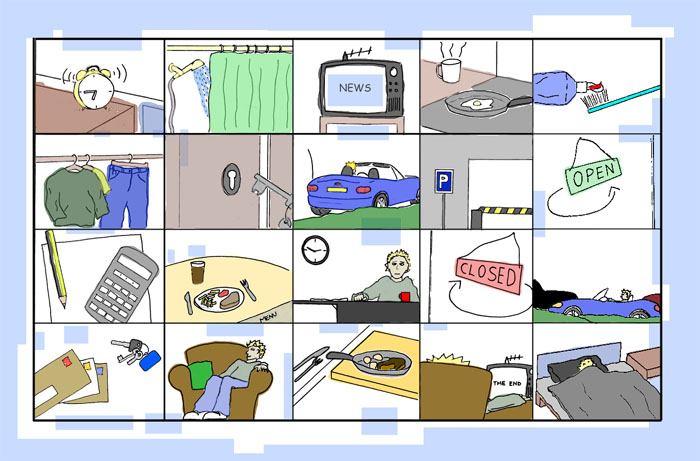
Group Work Storyboard


 Reflection on Storyboard:
Definition of Storyboard:
Storyboard refers to a series of diagrams that show how a project will look when completed.
Storyboard refers to a series of diagrams that show how a project will look when completed.
My Storyboard Features:
-A series of rough sketches that show the plot, action, characters, and setting of the Interactive Visual Representation.
-A series of pictures which support the action and content that will be contained in an audiovisual sequence.
-Gives the client a good idea of the concept for our group project.
Storyboard Title: Hong Kong Tourist Attractions
Storyboard Powerpoint Link.
Objective of our project:
1. To provide information about the major Hong Kong tourist attractions
2. Details: top attractions, parks, museums, heritage tour, local food, transport and useful Internet resources.
3.To develop interactive graphics in the map of Hong Kong.
4. Use Macromedia Flash to develop animation and buttons.
5. Develop Photostory by "Photo story 3 for Windows”
6. Create music, graphics, photos, narrations & illustrations in the photostory.
Improvement:
-Provide more reference links about HK tourist like "Discover Hong kong" for users to further study the places in HK.
-Simplify the content.
Other Various examples:
1. Children Animation http://www.animateonline.org/films/downloads/animate_rabbit_storyboard08.jpg
2. Art Work
http://www.artshole.co.uk/arts/artists/Mark%20Hazell/storyboard%20illustration.jpg
1. Children Animation http://www.animateonline.org/films/downloads/animate_rabbit_storyboard08.jpg
2. Art Work
http://www.artshole.co.uk/arts/artists/Mark%20Hazell/storyboard%20illustration.jpg
Monday, April 9, 2007
Create a digital story

Topic: Animals
Target: Primary two Students
Aim: To Identify Animals Names
Digital story by "photo story 3 for Windows".
Links: http://iln.cite.hku.hk/com/1374/users/swryuen/Animalsversion2.wmv
Reflection on Digital Storytelling:
Advantages of Animals Digital Storytelling:
1. New way of expression supported by technology.
2. Increase students’creativity and collaboration.
3. Development of traditional literacies and digital fluency.
Animals Digital Storytelling Features:
-Provide information about Animals
-Background Music
-Introduces Animals Name
1. Select Topic-Animals
2. Conduct Research (Reading Books)
3. Design Storyboard (Choose Animals)
4. Collect Materials (Collect Clipart and photos)
5. Develop Story (Add sound and assemble pictures)
6. Export Video
Educational Use of Digital Story:
We can use Digital Story in many ways. Teachers can introduce students to conduct research, synthesize information and gain expertise in the use of digital communication and authoring tools. According to University of Houston, Digital Story contains the following educational goals:
We can use Digital Story in many ways. Teachers can introduce students to conduct research, synthesize information and gain expertise in the use of digital communication and authoring tools. According to University of Houston, Digital Story contains the following educational goals:
Educational Goals of Digital Storytelling:
Teachers:
1. Diverse learning styles'
1. Diverse learning styles'
2. Motivation for the students.
3. Gain more Creativity.
4. Promote e-learning.
3. Gain more Creativity.
4. Promote e-learning.
Students:
1. Use the Internet to conduct research ( analyzing and synthesizing).
2. Develop communications skills.
3. Increase computer skills by a variety of multimedia including: text, still images, audio, video and web publishing.
Reference:
University of Houston's Educational Uses of Digital Storytelling: http://www.coe.uh.edu/digitalstorytelling/
Subscribe to:
Posts (Atom)